
Management
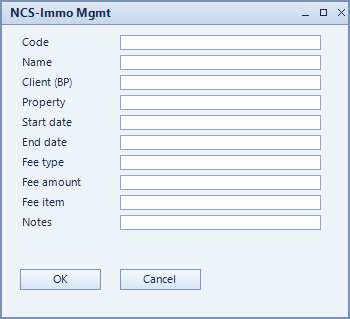
The management contract records for which client a property is managed, over which period and at what fee. It is the basis for invoicing your own management service.
What is this for?
- Record the term of the management contract.
- Define the fee by type and amount.
- Make the service billable through a fee item.
How to set it up
- Create the contract and assign property and client (BP).
- Set start date and end date.
- Choose the fee type, enter the fee amount and assign the fee item.
Fields of the form
Captions taken from the "NCS-Immo Mgmt" form (table @NCSIMMOMGMT).
| Field | Meaning |
|---|---|
| Code | Unique key of the record. |
| Name | Name of the record. |
| Client (BP) | Client the property is managed for. |
| Property | Property being managed. |
| Start date | Start of the management contract. |
| End date | End of the management contract. |
| Fee type | Type of fee, for example flat rate or per unit. |
| Fee amount | Amount of the fee. |
| Fee item | Item the fee is invoiced through. |
| Notes | Free text about the contract. |