
Unit
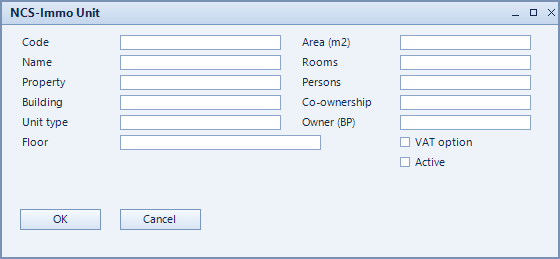
The unit is the smallest lettable or sellable space – a flat, commercial area or parking space. It carries the figures that scheduled charges and service-charge settlement build on later: area, number of rooms, persons and co-ownership share.
What is this for?
- Maintain the individual units of a building.
- Record the apportionment keys: area, rooms, persons, co-ownership share.
- Control the VAT option of the unit via VAT option.
How to set it up
- Create the unit and assign property and building.
- Choose the unit type and enter the floor.
- Record the figures: area (m2), rooms, persons, co-ownership.
- For owned units assign the owner (BP); set the VAT option where required.
Fields of the form
Captions taken from the "NCS-Immo Unit" form (table @NCSIMMOUNIT).
| Field | Meaning |
|---|---|
| Code | Unique key of the record. |
| Name | Name of the record. |
| Property | Property the unit belongs to. |
| Building | Building the unit is located in. |
| Unit type | Type of unit, such as flat, commercial space or parking. |
| Floor | Floor. |
| Area (m2) | Area in square metres – often the basis for apportionment. |
| Rooms | Number of rooms. |
| Persons | Number of persons – apportionment key for person-based costs. |
| Co-ownership | Co-ownership share, relevant for condominium management. |
| Owner (BP) | Owner of the unit as a business partner. |
| VAT option | VAT option applied to this unit. |
| Active | Enables the record. Only active records are evaluated. |